

Definition: Augmented reality is the computer-aided extension of the real world with digital content. Virtual reality lets users fully immerse themselves in virtual environments. AR is different: it overlays digital elements on the physical environment and so creates a mix of real and virtual perception.
AR systems use cameras, sensors and tracking algorithms to find the position and orientation of devices in the real world. Digital 3D models, information and interactive elements appear in the camera image in the correct perspective. They are anchored to real objects or positions in space.
In B2B, AR enables new forms of product visualization, remote support and interactive documentation. This is especially relevant for complex machines that need special expert knowledge for maintenance and installation.
English: Augmented Reality German: Erweiterte Realität
How Does Augmented Reality Work?
AR systems combine several technologies to position digital content precisely in the real world:
Camera and display
Smartphones, tablets or AR glasses continuously capture the real environment with a camera. The screen or the glasses display shows the processed image with the digital elements.
Tracking and position detection
AR systems use different tracking technologies to find the position and orientation of the device: - Marker tracking recognizes printed markers as reference points - Markerless tracking identifies natural features of the environment - SLAM creates a map of the environment and finds the position at the same time
3D rendering and perspective
The system calculates and renders 3D models in the correct perspective, based on the tracking data. The display adapts to the movements of the device in real time. Virtual objects thus stay stable at their position in space.
Interaction
Users can interact with AR content through touch gestures, voice commands or hand tracking. Industrial applications often use menus, buttons and sliders to change machine configurations or to show information.
AR Platforms and Devices
Smartphone and tablet AR
Modern smartphones and tablets are the most accessible AR platforms. Frameworks such as ARKit (iOS) and ARCore (Android) supply standardized APIs for markerless tracking. Because these devices are so common, mobile AR is ideal for product presentations and customer communication.
AR glasses (smart glasses)
Head-mounted AR displays such as Microsoft HoloLens, Magic Leap or industrial solutions such as RealWear enable hands-free work. Service technicians can see instructions and keep both hands free for tools.
Web-based AR (WebAR)
More and more browsers support AR through WebXR standards. Users can start AR experiences without app installation. This is ideal for marketing, sales and low-barrier product presentations. A QR code scan is sufficient.
Industrial AR systems
Specialized solutions for production and maintenance supply robust hardware for harsh environments, integration with ERP/PLM systems and certified safety standards.
Use Cases: Where B2B Environments Use AR
Remote service and technical support
Service technicians on site connect with experts at headquarters through AR glasses. The experts see the same image and can draw instructions that appear directly in the technician's field of view. Complex repairs are solved faster, and there are no travel costs for experts.
Maintenance instructions and step-by-step instructions
AR systems show context-sensitive instructions directly on the machine. Arrows point to the components to operate, tool positions are marked, and safety notes appear at the correct time. Error rates go down, and onboarding times become shorter.
Product visualization and sales
Machines and plants are visualized at full size at the planned installation site. Customers check the space requirements, the accessibility and the integration into existing production lines before the physical machine is delivered. You can switch between different configurations in seconds.
Training
Machine operators learn with virtual overlays on the real machine. Safety-critical areas are marked, and operating sequences are explained visually. AR training combines practical exercises on real hardware with digital instructions.
Quality control and inspection
Digital target values are placed over real components. Deviations become visible immediately. The system automatically records and documents measurement and test reports.
Assembly and production
Work instructions appear directly at the assembly workstation. Pick-by-vision systems guide workers to the correct component. Complex assembly sequences become visually clear, and error rates go down.
Factory planning and layout optimization
New machine layouts are projected into existing halls. You can check walkways, material flow and ergonomics at a 1:1 scale before the conversion starts.
AR in the Mechanical Engineering Industry
Challenges in mechanical engineering
Machines are complex and need specialized knowledge for operation, maintenance and repair. Technical documentation is extensive and difficult to access. Service tasks are expensive, especially at international locations. Product presentations need logistics effort or take place only at trade shows.
AR as a solution
Digital twins enable location-independent product presentations. Service technicians get contextual instructions directly at the machine. Remote experts give support on site without travel. Training becomes more interactive and more practical.
ROI from AR in service
Studies show 34% faster problem solving with AR-supported remote support. First-time fix rates increase by 25%. Travel costs for service experts go down by 40-60%. Faster fault diagnosis reduces machine downtime.
Integration with existing 3D data
CAD data from the design department is optimized for AR. One conversion enables use across different channels: AR, VR, web viewers, mobile apps, presentation systems.
Difference from Virtual Reality and Mixed Reality
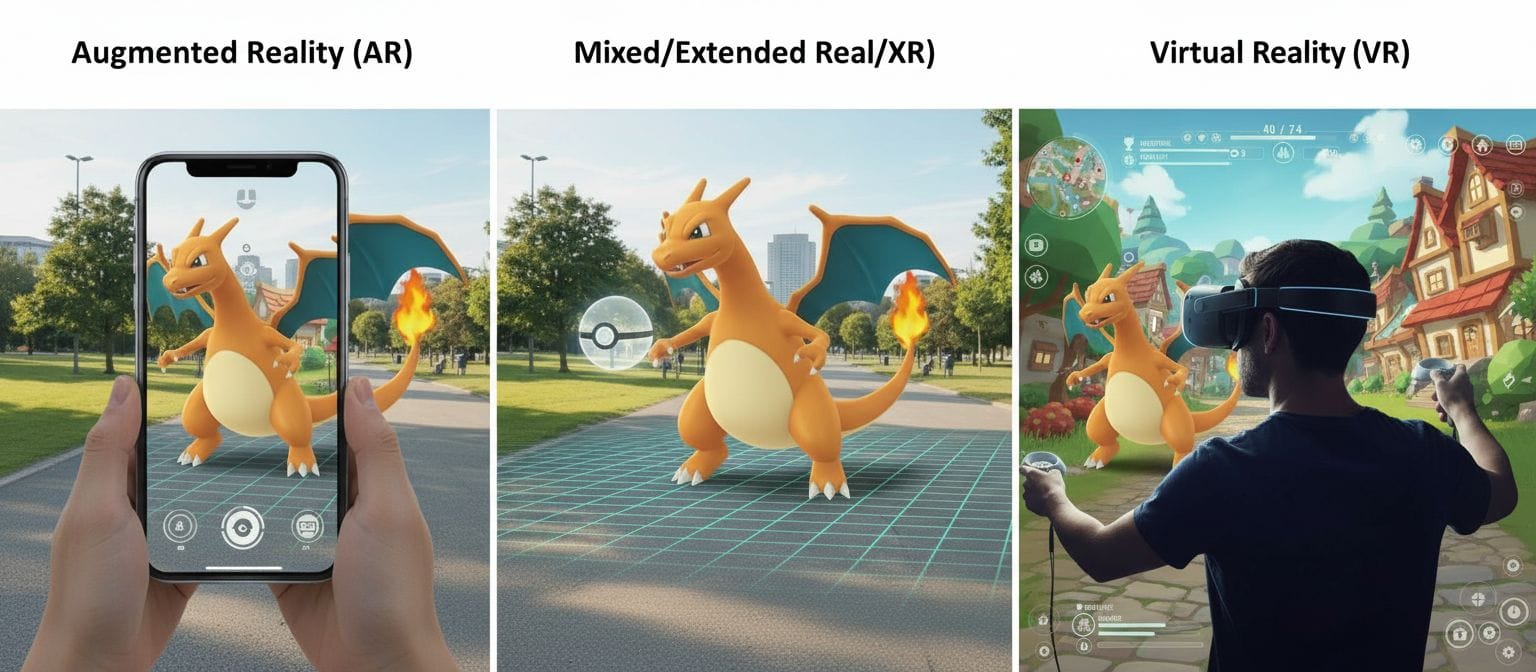
Augmented Reality (AR) - Digital content over the real world - The user sees a mix of real and virtual - Ideal for service applications and contextual information - Uses a smartphone, tablet or AR glasses - The environment stays visible, the context stays
Virtual Reality (VR) - Full immersion in a virtual world - The user sees only digital content - Ideal for training, collaboration and presentations without distraction - Needs a closed VR headset - The real environment is hidden
Mixed Reality (MR) - An extended form of AR with spatial understanding - Virtual objects interact with the real environment - Ideal for design reviews and spatial planning - Uses AR glasses with depth sensors - Anchors digital objects physically in space
Modern platforms combine all three approaches and select the best form of presentation for each use case.
AR Tracking Technologies in Detail
Marker-based tracking
Printed markers (QR codes, ArUco markers) are the reference points. Cameras recognize these patterns and calculate the position and orientation relative to the marker. This method is easy to implement and robust, but the markers must stay visible. Ideal for product presentations with flyers or brochures.
Markerless tracking (SLAM-based)
Systems recognize natural features of the environment (edges, corners, textures) and build a spatial map. No prepared markers are necessary. Users can move freely in the room. Ideal for spontaneous product visualizations at the customer site.
Image tracking
Special images or logos are the triggers. The AR content starts when the system recognizes the image. Often used in marketing and catalogs: the product image in the catalog activates the AR experience.
Object tracking
The system recognizes and tracks the 3D shapes of real objects. AR content can be anchored directly to machines, tools or components. Precondition: the system knows the 3D geometry of the object to track.
GPS and location-based AR
Outdoor AR uses GPS and a compass for approximate positioning. Relevant for building visualizations, construction site documentation or asset management on large sites.
Challenges and Limitations
Tracking stability
AR tracking can become unstable in poor light, on reflective surfaces or in environments with few textures. Virtual objects "drift" or jump. Modern SLAM algorithms continuously improve this.
Hardware heterogeneity
Different devices have different AR capabilities. Older smartphones do not support ARCore/ARKit. AR glasses are expensive and have limited battery life. Cross-device development takes much effort.
User acceptance
Some users find AR glasses uncomfortable. Smartphone AR needs one-handed operation, which is not practical for service work. Cultural and ergonomic factors have an effect on acceptance.
Content creation
AR-ready 3D models need optimization: a reduced polygon count for mobile performance, physically correct scaling and suitable textures. You must establish a CAD-to-AR conversion process.
Network and performance
Large 3D models need downloads or streaming. This can be a problem in industrial environments with limited Wi-Fi. Edge computing and 5G improve the situation.
Data privacy and security
AR systems capture camera images of the environment. In production environments, sensitive information can be visible. Data privacy policies and secure transfer are essential.
Frequently Asked Questions (FAQ)
What is the difference between AR on a smartphone and AR glasses?
Smartphones are common and low-cost, and they need no additional hardware. They are ideal for marketing, product presentations and occasional AR use. Disadvantage: one hand holds the device. AR glasses enable hands-free work. This is important for service technicians who must use tools. AR glasses give better spatial immersion, but they are more expensive (1,500-3,500 euros per device) and have limited battery life (2-4 hours of active use).
Can you use AR with existing CAD data?
Yes, you can convert CAD models from SOLIDWORKS, CATIA, Siemens NX and other systems for AR. The process includes polygon reduction (CAD models often have millions of polygons, AR needs thousands), texture baking (complex materials are "baked" into textures) and scale validation (1:1 size in AR). Modern conversion pipelines automate most of this. Important: after conversion, the models work across platforms: AR, VR, web, mobile.
Does AR also work without an internet connection?
Yes, AR tracking itself needs no internet. It runs locally on the device. But you must download the 3D models and content first. For service applications, an offline mode with preinstalled models is recommended. Cloud-based systems give version control and automatic updates, but they need connectivity. Hybrid approaches: base models offline, updates when Wi-Fi is available.
How accurate is AR tracking?
Under ideal conditions, modern SLAM-based AR systems reach an accuracy of 1-3 cm at a distance of 5 meters. Marker-based tracking is more precise (millimeter range), but needs visible markers. For technical applications (maintenance, assembly), AR is accurate enough to show positions and for approximate alignment. Precision measurements need dedicated measuring tools. GPS-based AR has an accuracy of several meters.
Which AR platform should I select for B2B applications?
For maximum reach: WebAR in the browser. It needs no app installation and works on iOS and Android. For regular use: native apps with ARKit/ARCore for better performance and offline capability. For service technicians: AR glasses such as RealWear (ruggedized, voice-controlled, hands-free). For design reviews: HoloLens or Magic Leap (spatial understanding, collaboration). A multi-platform approach is often useful: WebAR for sales, a native app for customers, AR glasses for service.
Industry Standards and Technologies
W3C WebXR Device API A standard for browser-based AR/VR experiences. It enables cross-platform AR without app installation. Source: https://www.w3.org/TR/webxr/
ARKit (Apple) Apple's AR framework for iOS devices with SLAM-based tracking, light estimation and plane detection. Source: https://developer.apple.com/augmented-reality/arkit/
ARCore (Google) Google's AR framework for Android with functions similar to ARKit and wide device support. Source: https://developers.google.com/ar
OpenXR standard A cross-platform standard of the Khronos Group for AR/VR applications. You develop once and deploy on different devices. Source: https://www.khronos.org/openxr/
glTF 2.0 format A Khronos standard for 3D assets on the web and in AR. Efficient transfer and display of complex scenes. Source: https://www.khronos.org/gltf/
ISO/IEC 18039:2019 Information technology – Software and systems engineering – Mixed and Augmented Reality Reference Model Source: https://www.iso.org/standard/61049.html
Related Topics
Immersive technologies: - Virtual Reality (VR) – full immersion in virtual worlds - Mixed Reality (MR) – anchored virtual objects in the real environment - Extended Reality (XR) – umbrella term for AR, VR and MR - visionOS – Apple's spatial computing platform
AR tracking technologies: - Marker tracking – AR with printed reference points - Markerless tracking – AR without prepared markers - SLAM – simultaneous localization and mapping - Image tracking – AR activation through image recognition - Object tracking – 3D object recognition and tracking
3D technologies: - 3D model – digital 3D representation for AR - CAD-to-3D conversion – workflow from design to AR - Real-time rendering – 3D display in real time - Level of detail (LOD) – performance optimization - PBR materials – physically based rendering for realism
Application areas: - Remote service – technical support through AR - Digital twin – virtual copies of real machines in AR - Product visualization – product presentation in AR - AR training – training with augmented instructions - AR maintenance – maintenance with digital overlays


