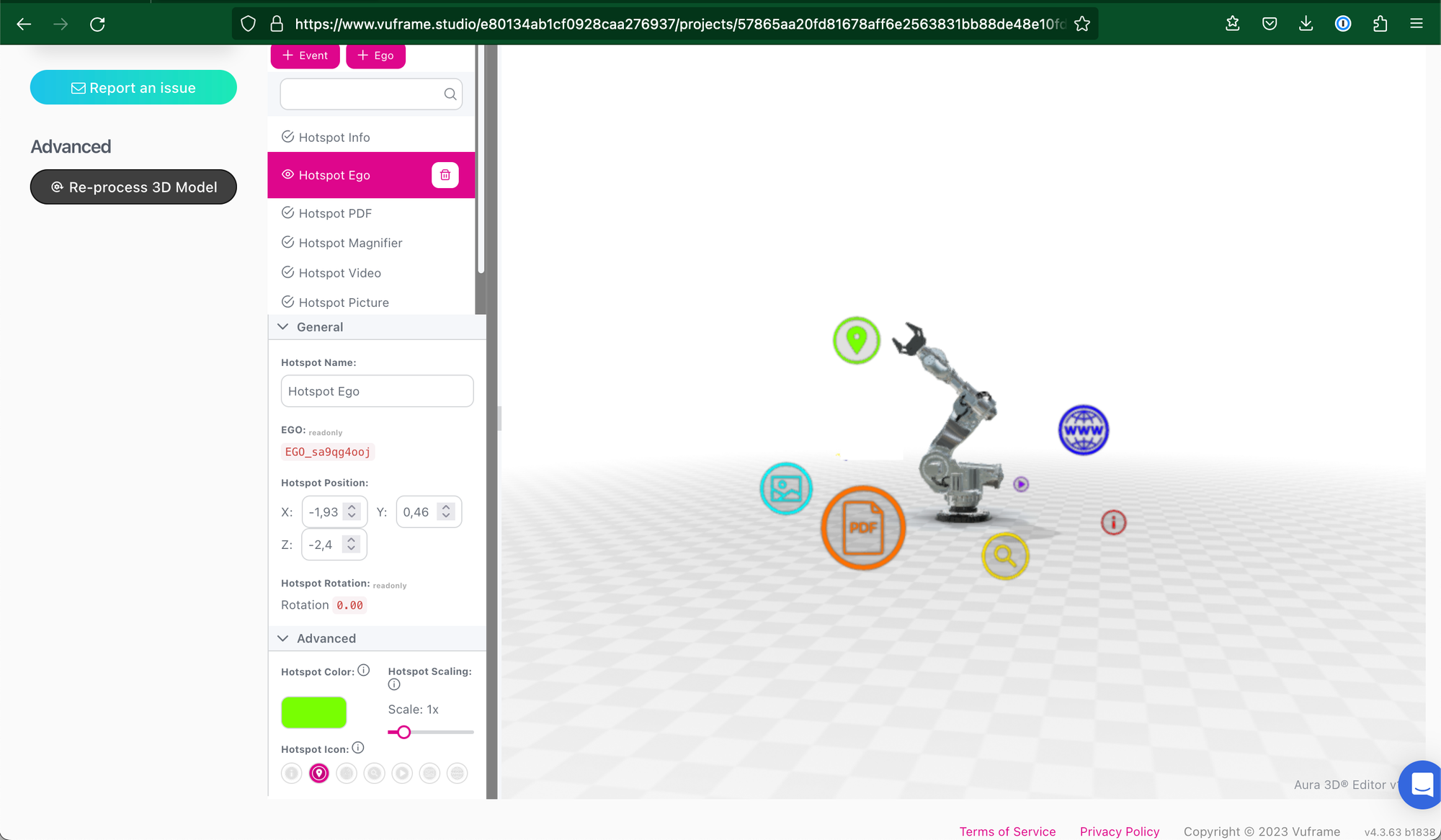
As announced this January, we are very excited to present you another Update for our Hotspot Editor! Let’s spice up your (and your customers) Vuframe experience even more with those new features: 🚀 Scaling Hotspots Enlarge or reduce Hotspot size. Bring more attention to specific POI’s or keep them in the background. 🚀 Changing Color of Hotspots Life isn’t black and white, and Hotspots aren’t anymore, too. Use any color you want. 🚀 Use different Hotspot Icons Our Hotspot sneak peek feature. Use different icons to give a quick impression what kind of content will be presented behind a Hotspot.
Get a first impression right here: Metallic Robot For further information don’t hesitate to contact your personal account manager.
After months of development we are happy to announce our Aura 3D® v2.0.0 Update. It contains the brand new WebAR support and introduces Corona Renderer for Cinema 4D into the Vuframe® platform.
Our feature set has developed even further. See for yourself: WebAR Support.usdz and .glb files are the foundation of every good WebAR solution. We support an automatic generation of these formats to support our own and your future WebAR applications. Custom Environment Our Custom Environment feature now supports lightmapping! What does that mean? Light is one of the cornerstones of visual fidelity in 3D. When lighting is done correctly, the 3D model will look better and more realistic. Corona Renderer Cinema4D Support Beginning with v2.0.0 we support Corona Renderer from version 1 to 8 for Maxon's Cinema4D.
This set of releases contain over 100 bugfixes regarding: - Hotspots - Material Mapping - Model Optimization - Lighting - Visual Fidelity Multiple customers already use the new Aura 3D® version and we appreciate their feedback. Contact us, if you wish to opt-in your workspace for Aura v2.0.0, too.
🚀 CAD Uploader Update - Reading of layer names (instead of only colors) from CAD formats like STEP, Catia and Solidworks - Support for Solidworks 2021 - Support for umlauts (diphtongs) and special characters in file names - Support for Zip files created with Windows 7 or earlier (DOS Codepage) 🐞 Bugfixes - Fix for missing textures after material mapping - Long filenames cause file uploads to fail - Distorted meshes (32bit vs 16bit) - Reflections are now displayed for all models, even pipeline-generated ones
Major Improvements - Processing Times cut down to 10% of original time - Failure rates now below 1% - Data reduction for STEP files now at 90-98% - Auraweb Conversion now available for CAD formats (STEP, CATIA, etc.) Contact us if you wish to opt-in your workspace for Aura v1.6.0
v1.0.8 (2020-10-2) - Fix: UV export v1.0.7 (2020-30-09) - Fix: export of compressed textures v1.0.6 (2020-29-09) - Fix: export of compressed textures v1.0.5 (2020-29-09) - Fix: export of non readable textures v1.0.4 (2020-28-09) - Material Emission flag is now supported support for Skinned Mesh Renderer - Fixed an issue where textures were compressed during export - fixed alpha cutout problem v1.0.3 (2020-09-10) - support for custom layers v1.0.2 (2020-08-13) - implemented automatic preview image generation - added option for custom shader mapping (see example scene) - support for EgoTriggers and LinkedTours (see example scene) - removed unnecessary dependencies - removed export of duplicate assets v1.0.1 (2020-08-07) - introduced export format Aura 3D (.aura3d) - updated examples scenes - Support for static preview images (see example scene) - Reduced the number of dependencies v1.0.0 (2020-08-03) - initial Release